AI Agent · Case Study
An Instagram account that runs itself, on a $12 droplet
By Abhishek Bajpai
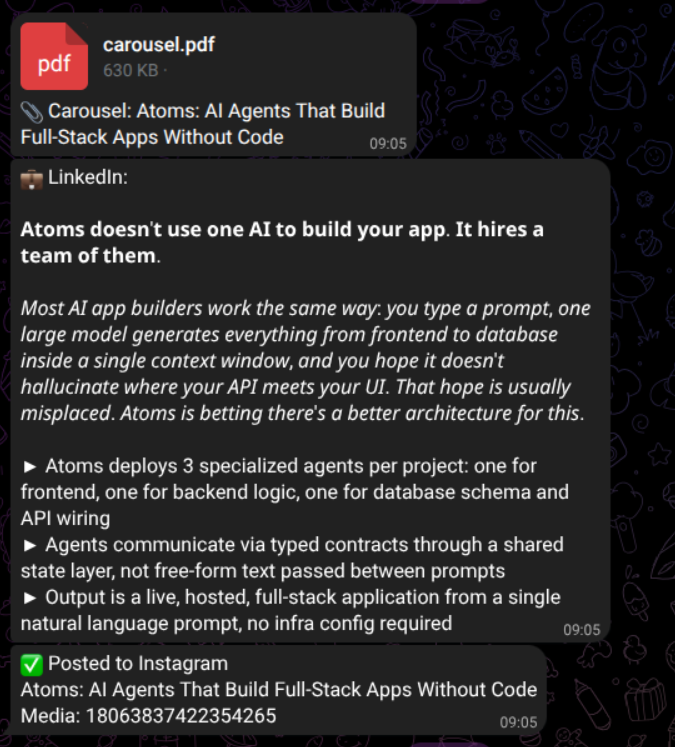
I haven't opened the Instagram app to make a post in over a month. The account still posts. Every morning at 9:00 AM IST, a cronjob on a DigitalOcean droplet wakes up, scrapes HackerNews, picks a story it thinks I'd find interesting, designs a six-slide carousel from raw HTML, writes the captions, ships it to Instagram, and drops the PDF into my Telegram so I can see what got posted while I was making coffee.
The whole thing costs $22 a month, and I'll show you why it actually costs me $0. There are no Canva templates. The "designer" writes its own HTML and picks its own layout every single day. I want to walk through how it works, the one decision that made the output stop looking like AI slop, and the parts I'm still not happy with.
Why I built this in the first place
I am not a content creator. I'm an engineer who happens to read a lot of tech news, and the audience for that lives on Instagram. The first version of @bajpai.tech was a Notion checklist and a Canva template. Predictably, I posted four times in three weeks and quit. The bottleneck was never the writing. It was the slide design. Sitting in Figma at 11 PM picking a font for headline 3 of an OpenAI explainer is a fast way to remember why you became a backend developer.
So the question I actually wanted to answer was different from the usual "how do I post more consistently." It was this: can the whole thing run with no human in the loop? Topic pick, research, design, captions, publish. All of it. Without me being the bottleneck or even the reviewer.
Two answers people give to that question, and why both of them are wrong:
- 1."Build a template-filler." A template-filler produces visibly templated output. Three posts in, every carousel has the same visual rhythm, the algorithm flags it, the account dies.
- 2."Have ChatGPT write a post and copy-paste it." That's a worse Notion checklist with extra steps. Still requires me, every day.
What I wanted was a system that picked a topic I would have picked, wrote copy I would have written, and shipped a design that didn't look like the other AI carousel slop already filling the feed.
How it actually runs
The diagram is the source of truth. Read it once and the rest of this section makes sense. The short version is that pipeline/main.py walks five phases in order.

| Phase | What happens | LLM? |
|---|---|---|
| 1. Research & asset collection | Scrapes HackerNews, tldr.tech, GitHub Trending (news days) or picks an evergreen topic (other days). Takes Playwright screenshots, downloads images, grabs a cover photo from a local asset folder. | No |
| 2. Topic synthesis | Writes research.md — a journalist narrative, every interesting number, a plain-English design brief, and an image map. | Yes — call #1 |
| 3. Carousel design | Writes 6 raw HTML slides from scratch. Playwright renders each to 1080×1350 JPEG. | Yes — call #2 |
| 4. Captions | Writes an Instagram caption (2–3 lines + hashtags) and a LinkedIn post (Unicode bold/italic). | Yes — call #3 |
| 5. Publish | Pillow combines slides into PDF. FastAPI on the droplet serves the JPEGs publicly so Instagram can fetch them. Graph API v21.0 publishes the carousel. Telegram drops the PDF + LinkedIn caption. | No |
Phase 1 — Research and asset collection.No LLM yet. Monday, Wednesday, Friday the pipeline pulls breaking AI/dev news from the HackerNews Firebase API, tldr.tech, and GitHub Trending. The other four days it picks an evergreen "Save This" topic — DSA, system design, career advice for developers. The same phase collects the visual material: Playwright screenshots of relevant pages (the leaked tweet, the GitHub release, the benchmark chart), downloaded inline images, and one personal photo from a local asset directory for the cover slide. Six to ten images get dropped into a working folder.
Phase 2 — Topic synthesis. First LLM call. The model gets the raw scrape and writes research.md— a four-to-six paragraph journalist narrative, every interesting number it found, a "design brief" in plain English, and a list of which downloaded images map to which moments in the story.
Phase 3 — Carousel design. Second LLM call. pipeline/design.py hands research.md to the model and asks it to write six raw HTML files. No template. The model picks a layout per slide from about ten archetypes — bento grid, full-bleed screenshot, typography-led, data viz, editorial card, stat callout. It pulls fonts from the seventeen .ttf files in bajpai-carousel/fonts/, writes its own headlines, and decides which of the collected images to use. Then bajpai-carousel/render.py runs Playwright headless Chromium over each file and screenshots it at 1080×1350.
Phase 4 — Captions. Third LLM call. Reads research.md, writes a casual Instagram caption with hashtags, and a longer LinkedIn post. LinkedIn doesn't render markdown, so bajpai-caption-writer/unicode_format.py converts bold and italic into Unicode-block characters. (That's how those 𝗯𝗼𝗹𝗱 LinkedIn posts work.)
Phase 5 — Publish. No LLM. Pillow combines the six JPEGs into a PDF. A small FastAPI app on the same droplet serves the slides at /api/assets/<slug>/slide/<n> so Instagram can fetch them directly — no Google Drive, no Cloudinary, no upload step. The carousel publishes, Telegram drops the confirmation and PDF, and .history.jsongets updated so the next thirty runs won't repeat the topic.
The decision that made the output stop looking like AI
I want to be specific about this because it's the only thing in this project I think is genuinely transferable.
The first version had a clean separation of concerns. A research agent produced structured JSON like this:
{
  "slide_3": {
    "layout": "stat_callout",
    "headline": "47% dead code",
    "subhead": "in the average JS bundle",
    "background_image": "img_03.jpg",
    "accent_color": "#FF6B6B"
  }
}
A second agent then filled an HTML template using that JSON. Clean, testable, easy to reason about. The output looked exactly like every other AI carousel. Every post had the same visual rhythm. The model had nothing creative to do because the schema had already made all the creative decisions. I killed it three weeks in.
The version that works does the opposite. The research agent now writes prose — a journalist-style narrative with a design brief in English. The design agent reads that and writes six HTML files from a blank slate. It picks the layout. It writes the headlines. It decides which images to use.
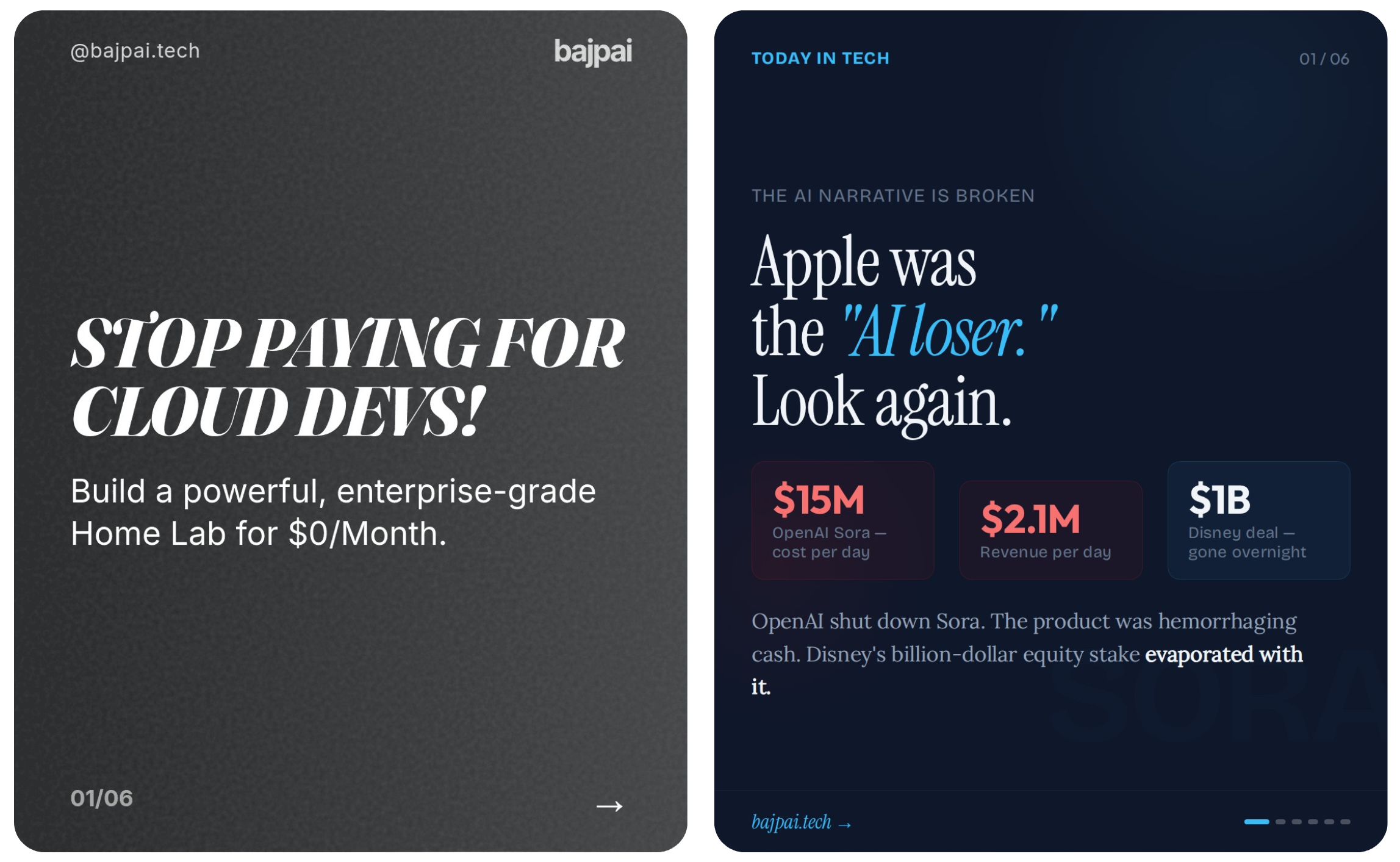
When you give an LLM a clean schema, you've already taken away the part of the job where it can demonstrate judgment. Fill-blank output, no matter how good your blanks are, looks like fill-blank output.When you give it prose and a blank file, it has to make a hundred small editorial calls per slide — typography, hierarchy, whitespace, where the headline breaks, whether the image bleeds off the edge. Those calls are where the "made by a person" feeling comes from.
The honest cost: output is more variable. About one slide in thirty has something noticeably off. More on that below.
Where it runs
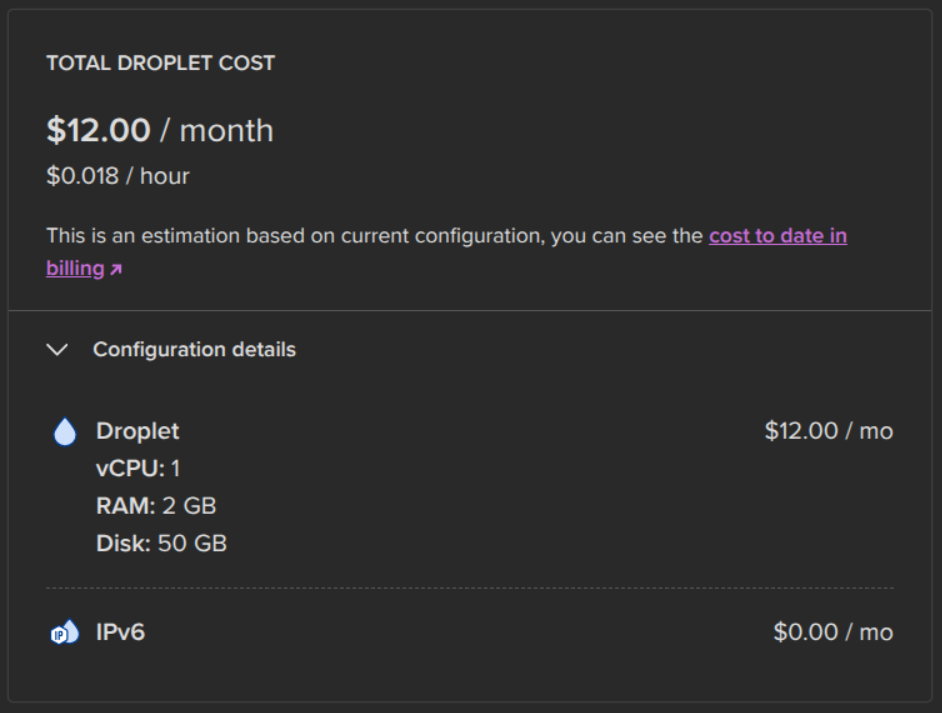
One DigitalOcean droplet — 1 vCPU, 2 GB RAM, 50 GB disk, $12/month. A single cronjob fires the pipeline at 9:00 AM IST. That's the entire production environment.
What it actually costs per post
The pipeline talks to the GitHub Copilot chat API using a token from device-flow OAuth. pipeline/copilot_auth.py runs the device flow once, caches the long-lived OAuth token, and refreshes the short-lived chat token in the background. That gives the pipeline access to Claude Sonnet 4.6 at the cost of a $10/month Copilot Pro subscription, instead of paying the Anthropic API per token.
Sonnet 4.6 on Copilot Pro costs 1× premium request per call. The pipeline makes exactly 3 LLM calls per run. Everything else is plain Python.
| Line item | Cost / month |
|---|---|
| DigitalOcean droplet (1 vCPU, 2 GB RAM, 50 GB) | $12.00 |
| GitHub Copilot Pro (Sonnet 4.6 access) | $10.00 |
| Telegram bot, Instagram Graph API, fonts | $0.00 |
| Total | $22.00 |
| Usage | Number |
|---|---|
| LLM calls per run | 3 |
| Runs per month | ~30 |
| Premium requests consumed | 90 / 300 (30% of monthly allowance) |
| Posts per month | ~30 |
| Cost per post | ~$0.73 |
| Cost per slide | ~$0.12 |
I picked Sonnet 4.6 over Opus 4.6 deliberately. Opus costs 3×premium requests per call — same pipeline on Opus would consume 9 premium requests per run and burn through the Pro allowance in about eleven days. The quality difference on this workload wasn't worth tripling the cost.
And then the part I have to be upfront about: this actually costs me $0. The GitHub Student Developer Pack includes Copilot Pro for free and $200 of DigitalOcean credit, which covers the droplet for well over a year. If you're a student and haven't claimed it yet, do that before building anything else.
What I'm still not happy with
The render step doesn't validate the slide.If the model picks a font size that doesn't fit a long headline, Playwright screenshots the overflow and that broken slide gets posted. About one in thirty slides has something noticeably off. The fix is a vision-model pass per rendered JPEG — the problem is that doubles the per-run LLM budget and I haven't decided it's worth it.
The research agent has a HackerNews-shaped bias. Good at AI launches, infra drama, security incidents. Bad at consumer-tech or anything outside the developer world. For @bajpai.tech this is fine. As a general-purpose content engine it has real blind spots.
No human review. This is the feature, not the bug, but it means a factual error will eventually go live. The mitigation is that research.md is required to cite sources and I read it after the fact when something in a post looks off. So far fine. I expect it to bite me at some point.
What's next
The pipeline isn't tech-specific. The only tech-specific parts are the research sources and the system prompts. Swap HackerNews for a finance news API, change the design brief, and the same five phases run a finance Instagram. Same for general news, productivity, fitness, books — anything where the daily job is "find a story, distill it, design a carousel, post it."
What I want to build next is one orchestrator running several of these accounts side by side from the same droplet, each with its own niche, brand, and posting schedule. The pipeline already separates "research source" from "design brief" cleanly enough that this is mostly a config-and-credentials problem, not a rewrite. When that works, the per-account cost drops to near zero because the droplet and the Copilot subscription are already paid for.
If you want to see what it actually ships, the account is at instagram.com/bajpai.tech. The cron fires at 9:00 AM IST. If a post lands in your feed today, no human touched it after the alarm went off.